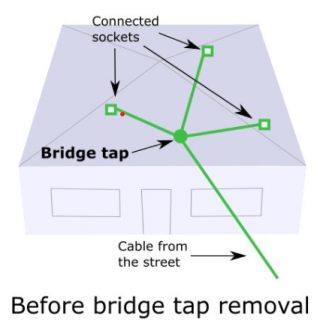
Also known as ‘star wiring’, a bridge tap is a junction where multiple cables are connected together. This allows the cable that comes in from the street to be split, to connect more sockets. This means more places to plug in phones or your modem.
Before NBN, having multiple sockets was ideal for most houses. Before 2018, most houses in Australia were connected to Telstra’s copper network (not NBN). With copper connections, the more phone sockets you have, the more options you have to connect telephones or your ADSL modem. You could have a phone plugged into a socket in the kitchen, a phone plugged in in a bedroom and the ADSL modem plugged in in the office. Also known as ‘star wiring’, a bridge tap is a junction where multiple cables are connected together. This allows the cable that comes in from the street to be split, to connect more sockets. This means more places to plug in phones or your modem.
Before NBN, having multiple sockets was ideal for most houses. Before 2018, most houses in Australia were connected to Telstra’s copper network (not NBN). With copper connections, the more phone sockets you have, the more options you have to connect telephones or your ADSL modem. You could have a phone plugged into a socket in the kitchen, a phone plugged in in a bedroom and the ADSL modem plugged in in the office.
However, with NBN, having a bridge tap can cause more harm than good. This is because the way the NBN works through the cables is different to the old ADSL.
In technical jargon: A bridge tap can cause an impedance mismatch and other undesired effects in signal transmissions.
A less technical way to explain: A bridge tap can be seen like a river that splits into other rivers. If 1 river splits into 3 rivers, the water flow gets divided. But if 2 of the rivers are blocked off and there is only one continual river, the speed of the water movement will be much faster, compared to when it was split into 3 rivers. So this can help explain how one cable to one socket can have a better internet flow, than if the cable is split into other cables.
How to find out if you might have a bridge tap at you’re address
Out of the 7 different NBN types, there are only 3 types of NBN technology where a bridge tap can be a problem. If this seems confusing, all you need to do is-
1. Go to nbnco.com.au
2. Type in your address
3. Check the ‘Technology used in your connection’
If it says- HFC, FTTP, Fixed Wireless or Sky Muster; you won’t have a bridge tap, as these technologies don’t use copper lines.
If it says- FTTN, FTTC or FTTB, there is a possibility that there is a bridge tap.
How to test to see if you have a bridge tap for your NBN service
Usually, when a bridge tap is present, more than one socket in the premises will work for an internet connection. To test the other sockets, try plugging in your modem to each socket. Leave the modem plugged in for 10 minutes and then check to see if the internet is working.
If the internet only works through one socket and not through the others, the bridge tap may have been removed already. Just remember, if only one socket is working, it’s a good start but it does not guarantee that there isn’t a bridge tap or any other issues with the cabling. If you’re unsure, you can contact your service provider for them to run a test, or you can contact us to arrange for a technician to check the cabling.
If the modem does work in more than one socket, that means there is probably a bridge tap. This will slow your internet speed and can cause dropouts.
How remove a bridge tap
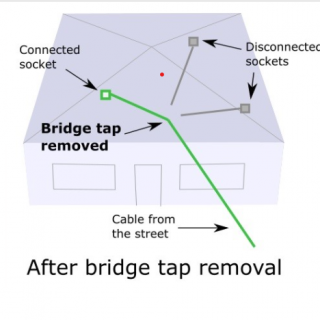
A licensed internet technician can change the cabling so that there is no bridge tap and the line connects through one cable directly to one socket. Contact us if you’d like to organise a technician visit.
Bridge Tap
Bridge Tap
However, with NBN, having a bridge tap can cause more harm than good. This is because the way the NBN works through the cables is different to the old ADSL.
In technical jargon: A bridge tap can cause an impedance mismatch and other undesired effects in signal transmissions.
A less technical way to explain: A bridge tap can be seen like a river that splits into other rivers. If 1 river splits into 3 rivers, the water flow gets divided. But if 2 of the rivers are blocked off and there is only one continual river, the speed of the water movement will be much faster, compared to when it was split into 3 rivers. So this can help explain how one cable to one socket can have a better internet flow, than if the cable is split into other cables.
How to find out if you might have a bridge tap at you’re address
Out of the 7 different NBN types, there are only 3 types of NBN technology where a bridge tap can be a problem. If this seems confusing, all you need to do is-
1. Go to nbnco.com.au
2. Type in your address
3. Check the ‘Technology used in your connection’
If it says- HFC, FTTP, Fixed Wireless or Sky Muster; you won’t have a bridge tap, as these technologies don’t use copper lines.
If it says- FTTN, FTTC or FTTB, there is a possibility that there is a bridge tap.